Best Apps to Record Nursing Lectures for Easier Studying
Why Recording Nursing Lectures Can Change How You Study
Nursing lectures move fast. In a single class period, your instructor might cover the pathophysiology of heart failure, the mechanism of action for three drug classes, priority nursing interventions, and the warning signs that mean a patient is deteriorating. Trying to write all of that down while also understanding it is close to impossible. Most students end up with half-finished sentences and a vague memory of something important about potassium.
Recording your lectures solves a specific problem. It lets you listen fully in the moment instead of transcribing every word. When you get home, you can replay the parts that confused you, catch the clinical pearls your instructor mentioned in passing, and fill gaps in your notes. Those offhand comments, such as "this is something I would definitely test you on," are often what separates a B from an A on unit exams.
Recordings also help with the way nursing content builds on itself. Fluid balance shows up again in renal, cardiac, and endocrine units, so being able to revisit an earlier lecture is valuable. The key is choosing a tool that fits how you actually study. Some apps excel at searchable transcripts, while others link audio to handwritten notes so you can tap a word and hear exactly what was said at that moment. The sections below walk through the strongest options and how to use them well.
Ask First: Recording Policies, Permission, and Patient Privacy
Before you hit record, check your program's policy. Many nursing schools allow lecture recording, but some require instructor permission, and some states require consent from everyone being recorded. Your syllabus or student handbook usually addresses this. If it is unclear, a short email to your instructor asking permission is professional and almost always well received. Students with documented accommodations can often get recording approved through their school's disability services office.
Classroom recording and clinical recording are completely different situations. You should never record in the clinical setting, including handoff reports, patient conversations, or bedside teaching. Doing so with a personal device puts protected health information at risk and can violate HIPAA, facility policy, and your program's code of conduct. Students have been dismissed from nursing programs for this.
Even in lecture, be thoughtful. Instructors sometimes share case studies drawn from real clinical experiences. Keep recordings for your personal study only, and do not post clips on social media or share them in public group chats. Treating your recordings with the same care you would give patient information builds the professional habits the NCLEX expects you to have. Questions about confidentiality and the safe use of technology show up regularly on the exam, so this mindset pays off twice.
Otter.ai and AI Transcription Apps for Searchable Notes
Otter.ai is one of the most popular choices among nursing students because it turns spoken lectures into text in real time. As your instructor talks, words appear on your screen, and when class ends, you have a complete transcript you can search. Want to find every time your professor mentioned "troponin" or "Kussmaul respirations"? Type it in, and Otter jumps straight to those moments with the audio attached.
The searchable transcript is the real advantage. Instead of scrubbing through a 90-minute recording, you can locate a specific concept in seconds. Otter also generates summaries and lets you highlight sections, which is useful for marking content your instructor emphasized. It runs on phones, tablets, and laptops, and recordings sync across devices. A free tier exists, though it caps the number of minutes you can transcribe each month, so heavy users often upgrade to a paid plan. Check for student pricing before you commit.
Keep in mind that transcription is not perfect with medical terminology. Words like "dysrhythmia," "pheochromocytoma," or drug names may come through garbled. Plan to proofread key sections and correct terms as you review. That correction process actually helps you learn spelling and pronunciation, which matters when you start writing care plans. For best accuracy, sit near the front of the room or near a speaker, since background noise and distance reduce transcription quality significantly.
Notability, GoodNotes, and OneNote: Syncing Audio With Handwritten Notes
If you prefer handwriting notes on a tablet, apps that sync audio with your writing are a game changer. Notability is the best known of these. While you record, the app tracks when you wrote each word or drew each diagram. Later, you tap any part of your notes, and the recording jumps to exactly what your instructor was saying at that moment. If you scribbled "ask about this" next to a diagram of the RAAS system, one tap replays the explanation.
GoodNotes, a favorite for its clean interface and organization, added audio recording with synced playback in its newer versions. It works especially well if you import your instructor's PowerPoint slides as a PDF and annotate directly on them during lecture. Many students find this combination ideal for nursing content, because slides give structure and handwritten additions capture the clinical reasoning.
Microsoft OneNote is a strong free option, particularly if your school provides Microsoft 365. You can insert audio recordings into a notebook page, and some versions link playback to the notes you typed while recording. OneNote also organizes notes into notebooks and sections, which suits the course-by-course structure of nursing school. Whichever app you choose, test the sync feature before your first big lecture, since availability can vary by device and app version.

Free and Built-In Options: Voice Memos, Google Recorder, and Microsoft Word
You do not need to pay for an app to record lectures effectively. Apple's Voice Memos comes on every iPhone, iPad, and Mac, and it is simple and reliable. Recent updates added transcripts on supported devices, which makes it more useful for studying than it used to be. If you just want a dependable backup recording, Voice Memos is hard to beat.
Android users with Google Pixel phones have Google Recorder, which transcribes on the device itself and makes recordings searchable by keyword. It is surprisingly accurate and does not require an internet connection, which helps in lecture halls with weak Wi-Fi. Students with other Android phones can usually find a built-in recorder, though transcription features vary by manufacturer.
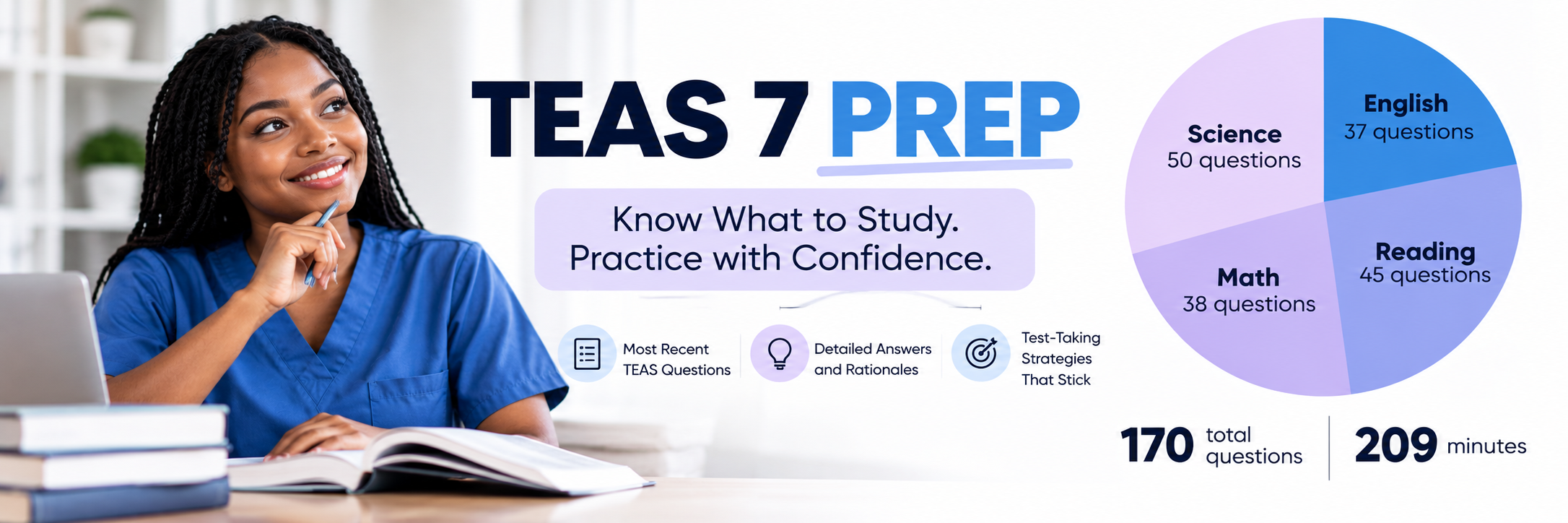
Microsoft Word for the web, available through many school Microsoft 365 accounts, includes a Transcribe feature that records audio or processes an uploaded file and produces a transcript you can edit inside a document. This is a convenient way to convert a recording into an outline you can revise and print. Free tools sometimes lack the polish of paid apps, but they are more than enough for most students. Pair a free recorder with the Nursing College Exams & Answers and you have a budget-friendly system that covers both content review and exam preparation.
Glean and Accessibility-Focused Note Tools
Glean, formerly known as Sonocent, was designed specifically for students who struggle with traditional note-taking, including those with learning differences, ADHD, or processing challenges. Instead of trying to capture everything in writing, you record the lecture and mark important moments with colored tags as they happen. You might use one color for key concepts, another for things to review, and another for content your instructor said would be tested.
Glean also lets you import slides alongside the audio, add brief text notes, and generate transcripts. Afterward, you can filter the recording to hear only the sections you tagged, which makes review sessions far shorter and more focused. For a dense pharmacology lecture, being able to replay only the parts you flagged as confusing can save hours.
Many colleges provide Glean free to students registered with disability services, so it is worth asking even if you are not sure you qualify. Nursing school is demanding, and using accommodations is not a sign of weakness. It is a smart use of available resources. If you have been diagnosed with a learning disability or attention condition, also look into whether you qualify for testing accommodations on the NCLEX itself, which are handled through your state board of nursing and Pearson VUE, and start that process early because approval takes time.
How to Turn Recordings Into Active Study Sessions
A recording only helps if you use it well. The biggest mistake students make is replaying entire lectures passively, like a podcast in the background. That feels productive, but it rarely leads to lasting learning. Instead, review your recording within 24 hours of class, focusing only on sections where your notes are incomplete or where you felt lost. Pause often, rewrite the concept in your own words, and ask yourself why the nursing intervention makes sense physiologically.
Next, convert what you hear into questions. If your instructor explained why you hold digoxin when the apical pulse is below 60 in adults, turn that into a self-test question. Building your own question bank from lectures is one of the most effective ways to retain information. You can supplement this with NCLEKS Q-Bank for Nursing Students to reinforce lab values, medications, and key signs and symptoms through spaced repetition.

Finally, test yourself with application-level questions. Nursing exams and the NCLEX rarely ask you to simply recall facts; they ask you to prioritize, recognize cues, and choose the safest action. After reviewing a unit's recordings, work through Free NCLEX practice exams on related topics to see whether you can apply what you heard. When you miss a question, return to the recording for that concept. This loop of listen, summarize, question, and apply is what turns recorded lectures into real exam performance.

No comments yet. Be the first to comment!